How do I export attorney profiles to PDF?
Last updated: August 27, 2026
Context
When searching for attorneys, you may want to export or download the results — for example, to review bios or share profiles with colleagues. This article explains how PDF export works and what alternatives are available.
Answer
You can export attorney profiles to PDF directly from your search results. However, there are a few important limitations to be aware of:
Maximum of 100 profiles per PDF export. If your search returns more than 100 results, you will need to export in batches.
Team notes are not included in PDF exports.
Matters data cannot be exported at this time.
The top attorney retention report cannot currently be downloaded.
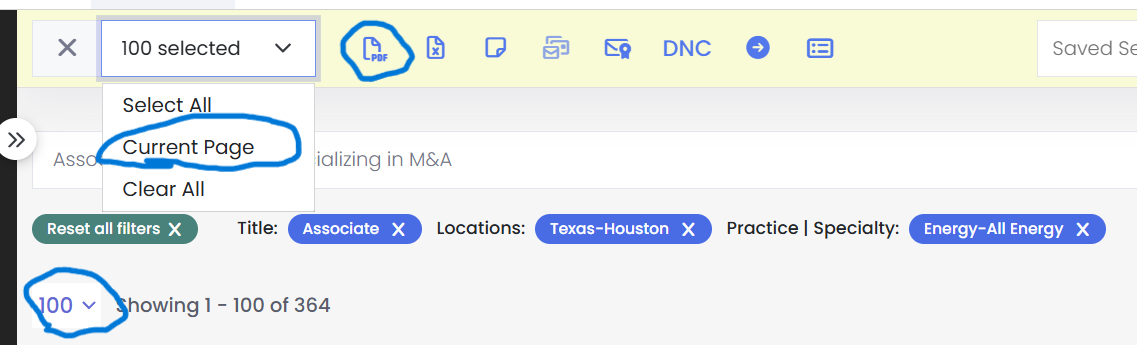
Exporting up to 100 profiles at a time
Set your results to display 100 per page.
Click Select and choose "Current Page" to select all profiles on that page.
Click Export to PDF.
Repeat for subsequent pages if needed, then combine the resulting PDF files.
Alternative: Share via link
Instead of a PDF, you can use the white share button on the right-hand side of the screen to generate a shareable link. This link provides access to the full set of results and remains active for 30 days.
If you need further assistance with a large export, please reach out to our support team and we can help combine files for you.